-Feb-15-2023-02-29-15-7102-PM.png?width=120&height=40&name=Untitled%20design%20(8)-Feb-15-2023-02-29-15-7102-PM.png)
What is Phone Call Detection?
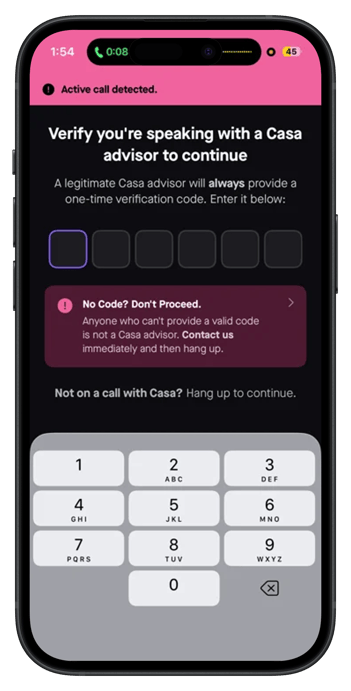
Phone Call Detection recognizes when you are on an active phone call and interrupts the send flow with a warning screen before you can complete a transaction. To proceed, you must take one of two deliberate actions: enter a valid verification code provided verbally by a legitimate Casa advisor, or hang up the call and proceed with your transaction.
Important:
Casa will never contact you over the phone. If you receive a call from someone claiming to be from Casa, hang up immediately and contact Casa through official support channels.
Why did we build Phone Call Detection?
Social engineering attacks are on the rise and almost always happen over a live phone call. Attackers typically:
- Impersonate someone you trust, such as a Casa advisor
- Create urgency to prevent you from thinking clearly
- Pressure you into sending bitcoin before you have time to verify
How it works
- You initiate a send from the Casa app.
- If your device detects an active phone call, the send flow is interrupted and a warning screen appears.
- To proceed, you must choose one of two options:
- Enter the verification Code provided verbally by your Casa advisor. If the call is legitimate, your advisor will always have a valid code to give you.
-
Hang up the call and continue the send without code entry.
4. Once verified, your transaction proceeds to the normal sending transaction steps.
Finding your Verification Code
Standard tier and above accounts (including all members of organization accounts) have access to a Verification Code in their app settings. This code works in both directions during a legitimate support call:
- You can ask your Casa advisor for their code to confirm you are speaking with a real Casa employee.
- Casa support can ask for your code to confirm they are speaking with the account holder.
To find your Verification Code:
-
Go to Settings and tap on Verification Codes.
-
Tap on Casa Advisor Verification code.
-
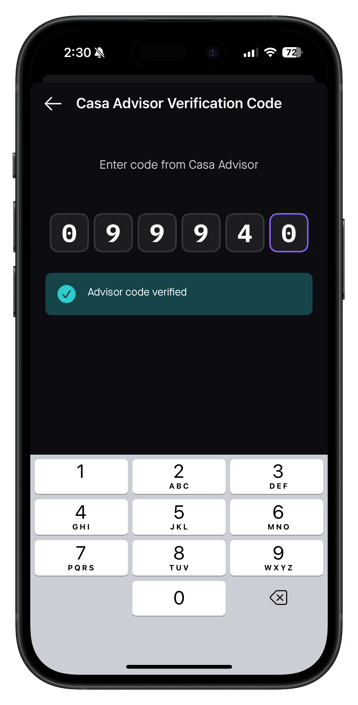
Ask the Casa advisor for their code and enter it into the number pad. If the code is accepted, you will see a confirmation screen before proceeding.
Frequently Asked Questions
Why am I seeing a warning when I try to send? If you see a warning screen when initiating a send, the app has detected an active phone call on your device. This is an automatic security feature designed to protect you from social engineering attacks. To proceed, enter the verification code provided by your Casa advisor, or hang up the call.
What does the warning screen look like?-portrait.png?width=377&height=743&name=IMG_7005%20(1)-portrait.png)
What if I enter the wrong code? You will see an error and can retry. After 5 failed attempts, the app will prompt you with additional context and a button to contact support directly. If you have reached this point, it is very likely the person on the call is not a legitimate Casa advisor. We recommend hanging up and reaching out to Casa by emailing help@team.casa.
-portrait.png?width=370&height=729&name=IMG_5261%20(2)-portrait.png)
Do I need to enter the code for every transaction on the same call? No. Once you successfully enter a valid code during a call, a verified session remains active for the duration of that call. You will not be re-prompted on subsequent transactions in the same session. When the call ends, the session is invalidated and you will be prompted again the next time a call is detected during a send.
Does Phone Call Detection work on all devices? Yes. Phone Call Detection works on both iOS and Android. It does not require microphone access. Detection coverage for calls placed through third-party apps may vary.
Need help?
If you need assistance or believe you may be the target of a social engineering attack, contact Casa directly by emailing help@team.casa.