-Feb-15-2023-02-29-15-7102-PM.png?width=120&height=40&name=Untitled%20design%20(8)-Feb-15-2023-02-29-15-7102-PM.png)
What You'll Need
- Ledger hardware wallet (e.g., Nano S+)
- Ledger Wallet app installed on your computer (version 2.32 or later)
Step 1: Open Settings
- Launch Ledger Wallet on your computer.
- Click the Settings icon (gear icon ⚙️) in the top-right corner of the screen.
Step 2: Enable Developer Mode
- Click on the "Experimental Features" tab in Settings.
- Find the "Developer Mode" toggle.
- Switch it ON (it will turn purple when enabled).
This allows Ledger Wallet to display and install apps that are tagged as experimental, including the Bitcoin Recovery app.
Step 3: Install the Bitcoin Recovery App
- Connect your Ledger hardware wallet to your computer via USB.
- In the left-hand sidebar, click "My Ledger".
- In the App catalog search bar, type "bitcoin reco" (or "Bitcoin Recovery").
- The Bitcoin Recovery app will appear in the results (Version 2.4.5 • 70 KB).
- Click the "Install" button on the right side.
- Wait for the installation to complete.
ℹ️ For reference, Ledger's own documentation on installing the Bitcoin Recovery app can be found here: support.ledger.com — Bitcoin Recovery app.
Step 4: Sign Your Transaction
- On your Ledger device, open the Bitcoin Recovery app instead of the standard Bitcoin app.
- Proceed with signing your transaction as you normally would.
A few things to expect during signing:
- Additional confirmation steps — The Recovery app includes a few extra prompts compared to the standard app. Simply follow and confirm each step on your Ledger device.
- A warning message — The app will display a notice that it is not intended for everyday use. This is expected and completely normal in this context. It does not affect the signing process in any way.
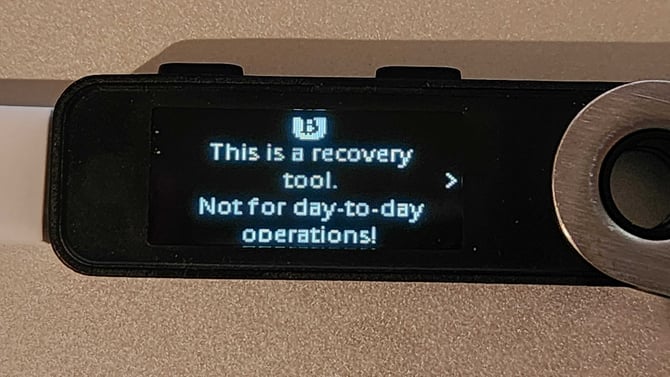
✅ Key takeaway: Using the Bitcoin Recovery app is purely a user experience change. Your transaction is signed the same way — just through a different app on your Ledger device.