-Feb-15-2023-02-29-15-7102-PM.png?width=120&height=40&name=Untitled%20design%20(8)-Feb-15-2023-02-29-15-7102-PM.png)
TL;DR — If someone contacts you claiming to be from Casa through any channel other than the official email (help@team.casa) or a video call you booked yourself, it is a scam. When in doubt, do not click anything and email help@team.casa to verify.
Casa will never call you by phone, ask for your seed phrase (a 12 or 24-word backup of your hardware key), request your private keys, or tell you to send bitcoin to an address.
Why crypto holders are targeted
Bitcoin and other cryptocurrency transactions are irreversible. Once a transaction is confirmed on the blockchain, there is no bank or payment processor that can reverse it. Scammers exploit this by impersonating trusted services, creating urgency, and pressuring you into acting before you have time to think. The most common attacks against Casa members are phishing emails, fake support accounts on social media, and phone calls from people impersonating Casa or other crypto companies.
Casa is designed to protect you from many of these risks. Your Casa vault uses multisig (requiring more than one key to authorize a transaction), which means that even if a scammer tricks you into compromising a single key, they still cannot move your bitcoin without access to additional keys. Casa cannot access your bitcoin. Casa holds the Casa Recovery Key offline on your behalf, but it cannot be used alone to move your funds, your vault requires a signing quorum (the minimum number of keys required to send bitcoin) that always includes keys only you control.
What Casa will and won't do
Casa will never:
- Call you by phone. Casa does not make outbound phone calls, period. If you receive a phone call from someone claiming to be Casa, hang up immediately. Casa will also never ask you to call a phone number.
- Ask for your seed phrase, private keys, or passwords. No Casa team member will ever ask you to share your seed phrase, your private keys, your 2FA codes, or your Casa account password — not by email, not by chat, not on a video call.
- Send you unsolicited direct messages. Casa does not reach out through social media DMs, Telegram, Discord, or any messaging platform. Any unsolicited message claiming to be from Casa is fraudulent.
- Ask you to send bitcoin to an address. Casa will never instruct you to transfer bitcoin or ether to any address for "verification," "security," "upgrades," or any other reason.
- Send you a link to download software outside of the official app stores. The Casa app is available only through the Apple App Store and Google Play Store.
Casa will:
- Communicate with you via email from help@team.casa or from addresses ending in @team.casa.
- Offer video calls (via Google Meet) that you book using an official Casa calendar link — never an unsolicited invitation.
- For Premium and Private Client members: use in-app verification codes to confirm both your identity and your advisor's identity before discussing anything sensitive. You should always ask your advisor for their verification code too. See Enhanced Account Security: Verification Codes.
How to spot a scam
Urgent or threatening language
Scam messages almost always create a false sense of urgency, phrases like "your account will be locked in 24 hours," "unauthorized login detected," or "your vault has been compromised." The goal is to make you act before you think. Casa will never pressure you with deadlines or threats. If something feels urgent, slow down and verify through official channels.
Misspelled email addresses and domains
Scammers use email addresses and website URLs that look almost identical to the real thing. For example, the legitimate Casa support email is help@team.casa. A scammer might use something like help@team.csa, help@tearn.casa, or support@casa-security.com , close enough to pass a quick glance, but not the real address. Always check the full sender address and domain carefully before clicking any link or replying.
For the full list of official Casa domains, see: Official Casa Owned Domains.
Unexpected requests for private information
No legitimate company will ask you to share your private keys, seed phrase, 2FA codes, or account password. If anyone asks for this information, regardless of who they claim to be, it is a scam.
Fake customer support accounts
Scammers create fake accounts on Twitter/X, Reddit, Telegram, Discord, and other platforms that look like official Casa support. They often respond to public posts where people mention Casa or bitcoin issues. Casa does not provide support through social media DMs. If you need help, email help@team.casa directly.
Suspicious links or attachments
Phishing links may lead to a website that looks identical to the real Casa app or help centre but is designed to steal your credentials. Before clicking any link, hover over it to see the full URL. If the domain is not on the official Casa domain list, do not click it. Never download attachments from unknown senders.
"Too good to be true" offers
Giveaway scams — "send 0.1 BTC and receive 1 BTC back" — are one of the oldest and most common tactics. No legitimate company or individual will ask you to send cryptocurrency in exchange for receiving more back. If it sounds too good to be true, it is.
Poor grammar or inconsistent formatting
Many phishing messages contain awkward phrasing, unusual formatting, or inconsistent branding. These are signs of mass-produced scam content. However, some phishing emails are now very polished, so grammar alone is not enough to determine legitimacy, always verify through official channels.
Examples of phishing attempts
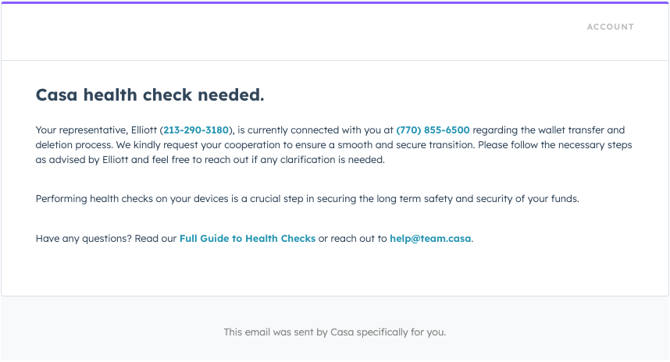
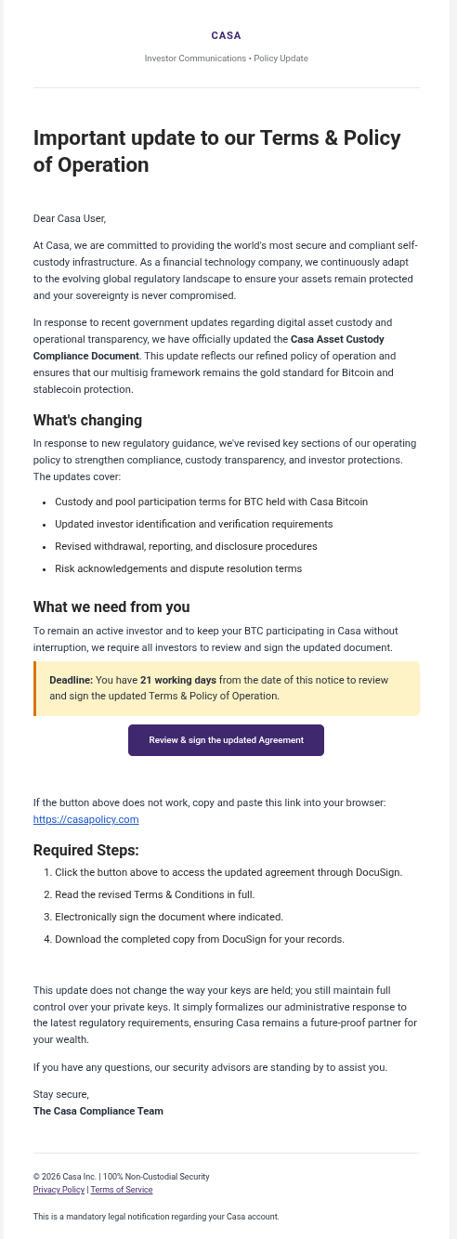
Example of a sophisticated phishing email impersonating Casa
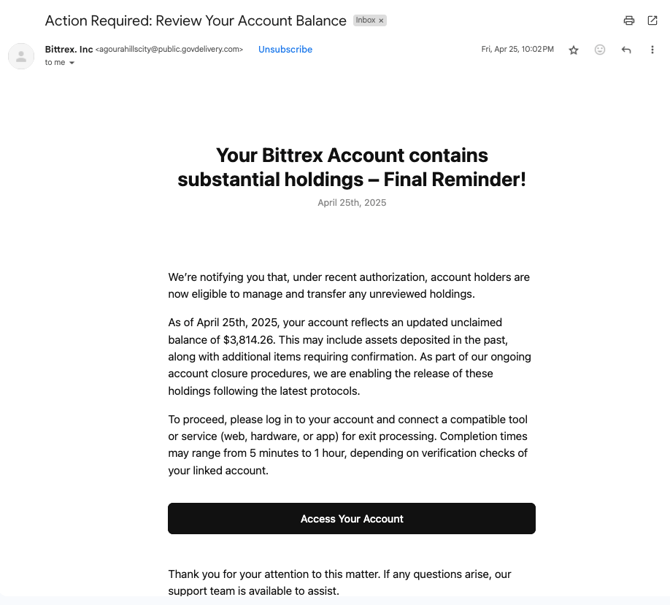
Example phishing email with suspicious link
Why Casa's design protects you
Casa is a non-custodial service. This means Casa does not hold, control, or have the ability to move your bitcoin or ether. Your Casa vault is protected by multiple keys, and only you hold enough of them to authorize a transaction. The Casa Recovery Key, which Casa holds offline on your behalf, is just one key in a multisig setup. It cannot be used alone to access your vault.
This design means that even if a scammer compromises one of your keys, they cannot move your funds without also compromising additional keys that are stored in separate locations. It also means that no one at Casa, not an employee, not a support agent, not an advisor, can access or move your bitcoin on your behalf. Anyone who claims otherwise is not representing Casa.
What to do if you suspect a scam
- Do not click any links, download any attachments, or share any information.
- Do not send bitcoin or ether to any address provided in the suspicious communication.
- Take a screenshot of the message, email, or website, including the sender's email address or the full URL.
- Report it to Casa by emailing help@team.casa with the screenshot and any email headers you can include. Email headers help the Casa Security team trace where the message came from.
- If you believe one of your keys may have been compromised, contact Casa support immediately to discuss a key rotation (replacing one key in the vault with a new one).
Need help or want to report something?
If you have received a suspicious email, phone call, text message, or social media message that appears to be from Casa, or if you believe you may have been the target of a scam:
-
Standard members: email help@team.casa with a description and screenshots of the suspicious contact. Include full email headers if the scam was sent via email.
-
Premium and Private Client members: reach out to your dedicated Client Advisor directly, or email help@team.casa. Before discussing anything sensitive, use your in-app verification codes to confirm you are speaking with a legitimate Casa team member.