-Feb-15-2023-02-29-15-7102-PM.png?width=120&height=40&name=Untitled%20design%20(8)-Feb-15-2023-02-29-15-7102-PM.png)
Guardian Mode
Guardian Mode is a security feature for your Casa vaults that puts a human checkpoint between you and any outgoing transaction. When it's active, every transaction requires a Casa Key signature and a video verification with two Verified Casa Advisors before it can be sent.
Think of it as a standing instruction to your future self: if I ever try to move these funds quickly, make someone check on me first.
Why it exists
Most security tools are designed to keep attackers out. Guardian Mode is designed for a different threat: being manipulated into authorising a transaction yourself.
Social engineering attacks don't need to compromise your wallet. They just need to convince you to use it. through impersonation, urgency, or fear. Guardian Mode is the layer that holds even when your judgement doesn't. No transaction leaves a Guardian Mode vault without someone independent confirming you meant to send it, that you recognise the destination, and that you're acting freely.
To learn more about how these attacks work, see: Protecting yourself from social engineering attacks.
What Guardian Mode covers
Guardian Mode is enabled per vault. You choose which vaults to protect, you might enable it on a long-term savings vault and leave a spending vault unrestricted. Incoming transactions are never affected. You can receive funds into a Guardian Mode vault at any time.
How to enable Guardian Mode
No call or appointment needed. Enable it directly in the app:
- Open the Casa app and tap on the vault you want to protect.
- Tap the key icon (top-right corner)
- Tap Guardian Mode at the bottom of your screen
- Tap Submit
- Tap Done
You'll see a Guardian Mode indicator on the key menu screen confirming it's active.
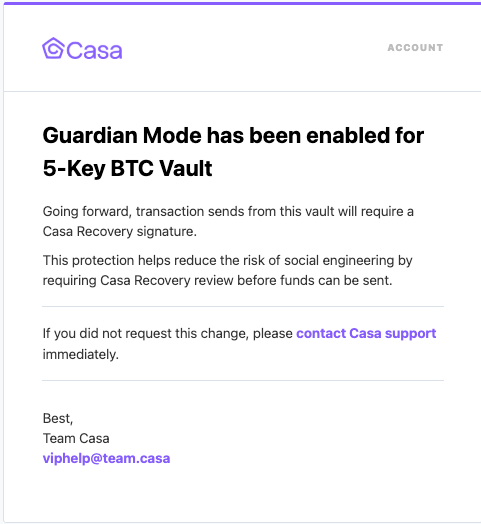
Sending from a Guardian Mode vault
Every outgoing transaction follows the same process, regardless of amount:
- Create the transaction and sign with your mobile and/or hardware keys as usual.
- When it's time for the final signature, the app will prompt you to request the Casa Key signature.
- Schedule a video verification call with two Casa Client Advisors.
- On the call, the advisors verify your identity, confirm the transaction details, and confirm you're acting of your own free will.
- After the call, the Casa Key signature is added within 2 business days.
How to disable Guardian Mode
Guardian Mode is easy to turn on and intentionally harder to turn off.
- Open the Casa app, go to your vault, and tap the Guardian Mode row.
- Tap Book a call to schedule a video verification with your Client Advisory team.
- Two advisors will verify your identity and confirm you're requesting deactivation on your own initiative.
- A 48-hour waiting period begins. You can cancel at any time during this window by contacting your Client Advisory team.
- After 48 hours, your advisor completes the deactivation and you'll receive email confirmation.
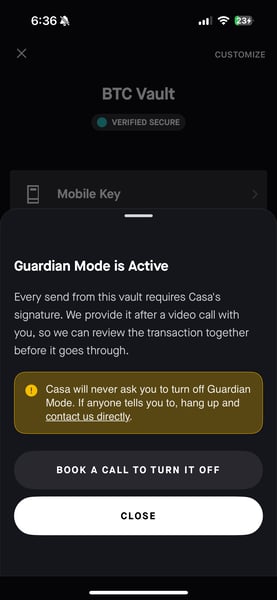
Casa will never ask you to turn off Guardian Mode.
If anyone, including someone claiming to be from Casa contacts you and asks you to disable Guardian Mode, that is a social engineering attack. Do not do it.
Casa only turns off Guardian Mode when you initiate it. We will never call, email, or message you to request it. If you suspect this has happened, contact us immediately at help@team.casa.
Guardian Mode and your membership
Guardian Mode is available to Premium and Private Client members. There are two scenarios worth knowing before you rely on it:
If your membership expires and the 30-day grace period ends, Guardian Mode becomes inactive. Your vault detail page will show this and link you to renew. The setting is preserved once you renew, you can re-enable it in the app.
If you downgrade to Standard or Standard-Plus, Guardian Mode will no longer be available. You'll see a clear warning before confirming any downgrade.
Guardian Mode stays active if you move between Premium and Private Client tiers, and through all key operations including replacements, rotations, and recovery events.
Frequently asked questions
Is Guardian Mode available for business or enterprise accounts?
Business and Enterprise accounts have access to a more configurable version of this protection. Rather than Guardian Mode, organizations can set up maker-checker controls with customizable approver requirements, including four-eyes approval, where two independent parties must authorize any outgoing transaction before it can be sent.
To learn more about transaction controls for your organization, reach out to help@team.casa.
Does replacing or rotating a key affect Guardian Mode? No. Guardian Mode remains active through all key operations.