-Feb-15-2023-02-29-15-7102-PM.png?width=120&height=40&name=Untitled%20design%20(8)-Feb-15-2023-02-29-15-7102-PM.png)
Step 1: Send crypto to your Buy/Sell account
- Open your vault or Pay Key and tap "Send."
- Under Send Shortcuts, select "Buy/Sell Account."
- Enter the amount, sign, and complete the transaction.
- Once confirmed on-chain, the asset will appear in your Buy/Sell account.
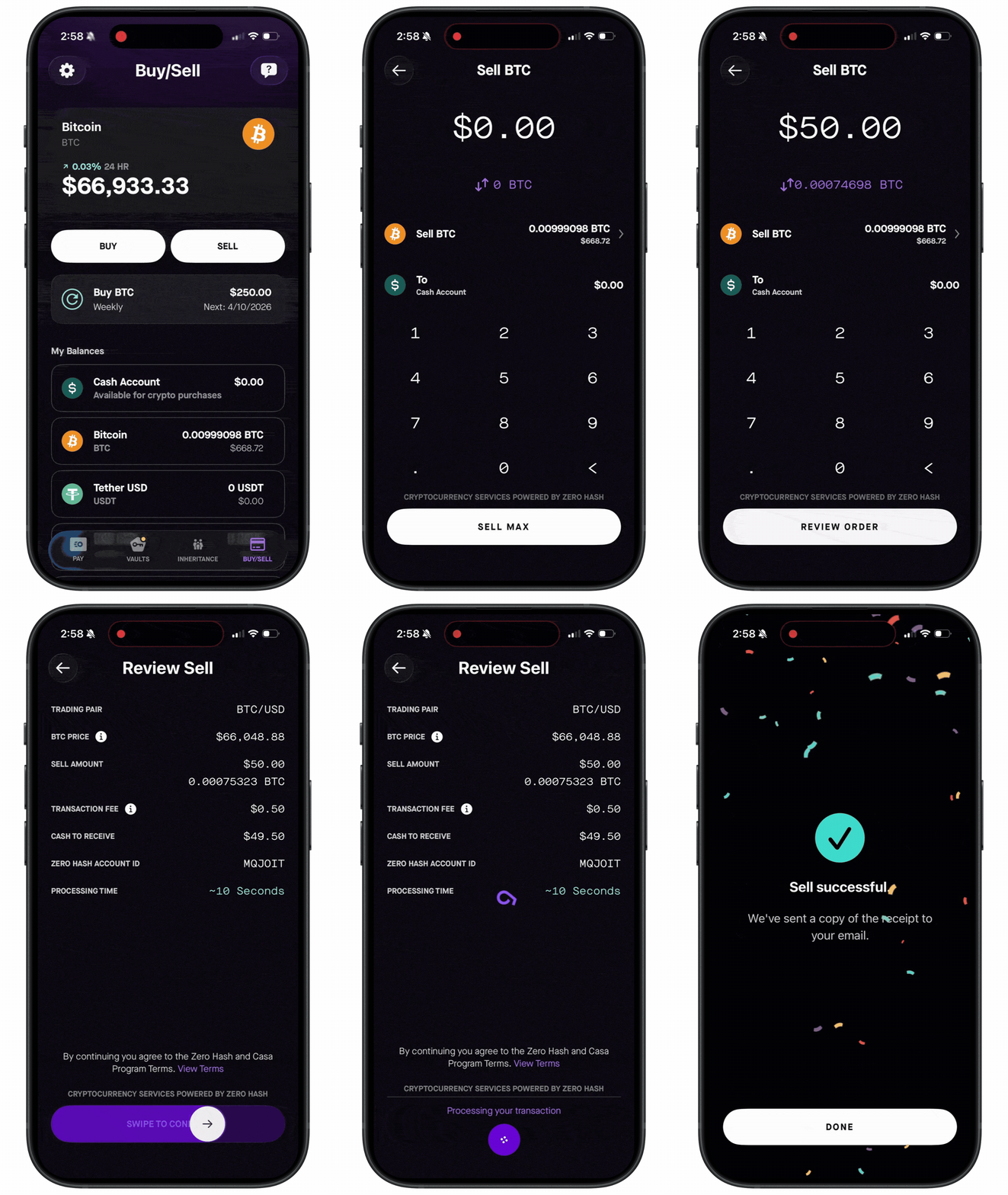
Step 2: Sell
- In your Buy/Sell account, tap "Sell."
- Choose the asset you want to sell (BTC is selected by default).
- Enter the amount, or tap "Send Max" to sell everything (up to $500,000).
- Tap "Review Order," and swipe to confirm.
- You'll receive an email confirmation. Your cash will appear in your Cash Account.
Step 3: Withdraw your cash From your Cash Account, you can withdraw to your bank via ACH (up to $5,000) or wire transfer (over $10,000).
See also: