-Feb-15-2023-02-29-15-7102-PM.png?width=120&height=40&name=Untitled%20design%20(8)-Feb-15-2023-02-29-15-7102-PM.png)
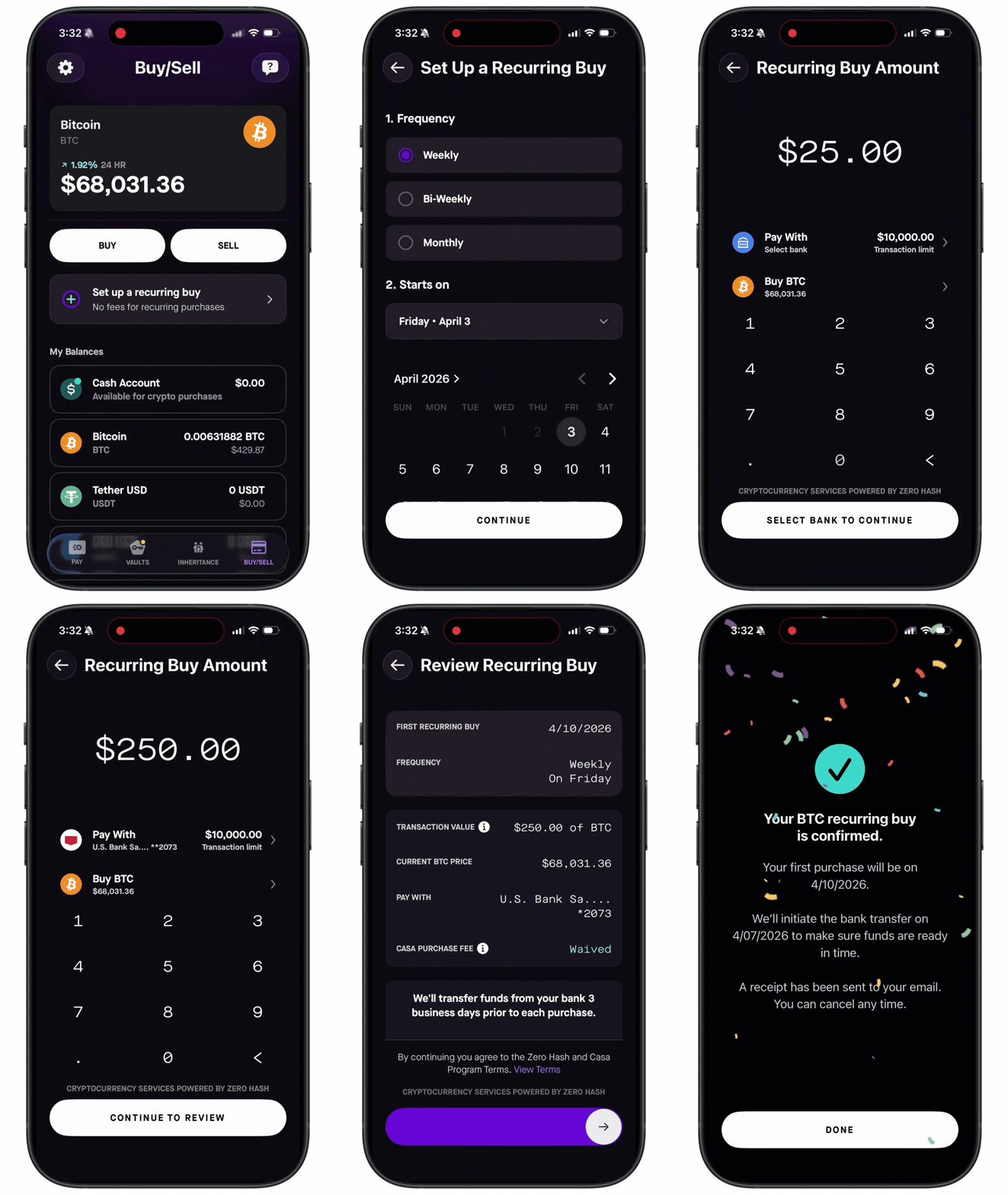
To set up a recurring buy:
- Go to the Buy/Sell tab
- Tap "Set up a recurring buy"
- Choose your frequency and start date.
- Select the amount, funding bank account, and asset (BTC, ETH, USDT, or USDC)
- Review details and swipe to confirm the recurring buy.
How it works:
- An ACH transfer is automatically initiated 3 business days before each scheduled buy, giving the cash time to settle before the purchase executes.
- The amount of crypto you receive may vary depending on the market price at execution time.
- You'll get an email when the ACH transfer completes and a second email when the buy executes.
If something goes wrong:
- Insufficient funds: The ACH transfer will fail and the scheduled buy will be skipped. The system tries again on your next scheduled date.
- Bank account disconnected: Your recurring buy will be cancelled. Reconnect your bank and set up a new recurring buy to continue.
Fees: The standard ACH transfer fee applies (waived on amounts of $250 or more). No additional trading fees for recurring buys.
See also: