-Feb-15-2023-02-29-15-7102-PM.png?width=120&height=40&name=Untitled%20design%20(8)-Feb-15-2023-02-29-15-7102-PM.png)
How to Enable Whitelisting
- Log in to your Casa account at casa.io
- In the left-hand menu, select Address Book
- At the top of the page, locate the Whitelisting toggle (shown as OFF by default)
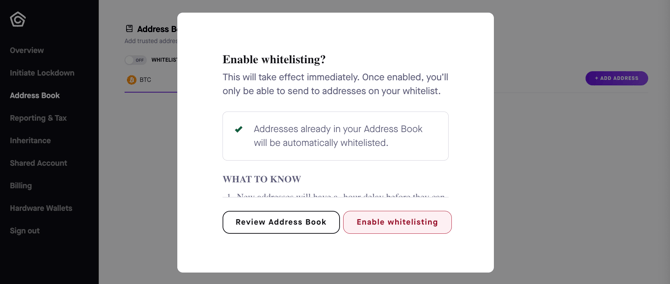
- Click the toggle and a confirmation dialog will appear
- Review the information in the dialog, then click Enable whitelisting to confirm
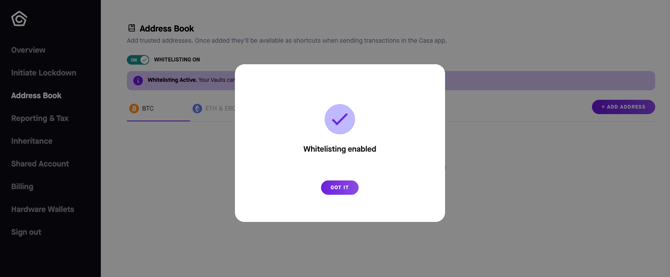
Once enabled, the toggle will display Whitelisting ON and a banner will confirm that whitelisting is active across your vaults and Pay keys.
What Happens When You Enable Whitelisting
- Takes effect immediately. The restriction applies to all your vaults and Pay keys as soon as you confirm
- Existing addresses are automatically whitelisted. Any addresses already saved in your Address Book will be approved without any additional steps
- New addresses have a 48-hour waiting period. Newly added addresses will not be available for transactions until 48 hours after they are added. This is by design, to protect against unauthorized address additions
Before You Enable Whitelisting
We recommend reviewing your Address Book before turning on this feature to make sure all the addresses you regularly send to are already saved. You can do this directly from the confirmation dialog by clicking Review Address Book.
Managing Whitelisted Addresses
To add a new address to your whitelist:
- Navigate to Address Book in the left-hand menu
- Click + Add Address in the top right
- Add in the address details and save
The new address will be added to your Address Book and will become active after a 48-hour waiting period.
To remove an address from your whitelist, please note that removals are also subject to a 48-hour waiting period before they take effect.
Turning Off Whitelisting
If you choose to disable whitelisting, please be aware that this change is also subject to a 48-hour waiting period. Whitelisting will remain active and enforced across your vaults and Pay keys until the waiting period has passed.
Things to Keep in Mind
- Whitelisting applies across all your vaults and Pay keys
- You will be unable to send to any address not on your whitelist while this feature is active
- Newly added and removed addresses each have a 48-hour waiting period before changes take effect
- Disabling whitelisting is also subject to a 48-hour waiting period
- Make sure your Address Book is up to date before enabling, to avoid any disruption to planned transactions
Need Help?
If you have questions about whitelisting or need help in setting up your Address Book, reach out to us at help@team.casa.